FromExcel()#
Description#
FromExcel() creates a Table by reading data from an Excel (.xlsx) file.
This function helps when you want to load tabular data from an Excel source into Rowan. It reads the file, parses its rows and columns, and converts them into a Table structure.
Signature#
FromExcel(path string, opts ...ExcelOption) (*Table, error)Parameters#
path
The file path to the Excel file.opts
Optional Excel configuration options. These options allow you to customize how the Excel file is read, such as changing the range.
Return Values#
*Table
A pointer to the resultingTablecontaining the file data.error
An error is returned if the Excel file reading or theTableconstruction fails.
Behavior#
- Reads the Excel file from the given path.
- Uses the provided Excel options (if any) to configure reading behavior.
- Automatically infers column names from the top row.
- Returns an error if:
- The file cannot be read.
- The sheet is empty.
- The data is not successfully parsed.
Notes#
- The returned
Tableis immutable; operations likeSelect(),Drop(), orAddColumn()return new tables. - Column values are stored as []any and may require type conversion for numeric operations.
- CSV reading behavior can be customized using helper options such as
WithExcelRange().
Related Functions#
WithExcelRange()
Customize the CSV delimiter character.FromSheets()
Create aTablefrom a spreadsheet in Google Sheets.
Example Usage#
See this example for practical usage of FromExcel().
Assume we have an Excel file named “data.xlsx” which contains data as below:
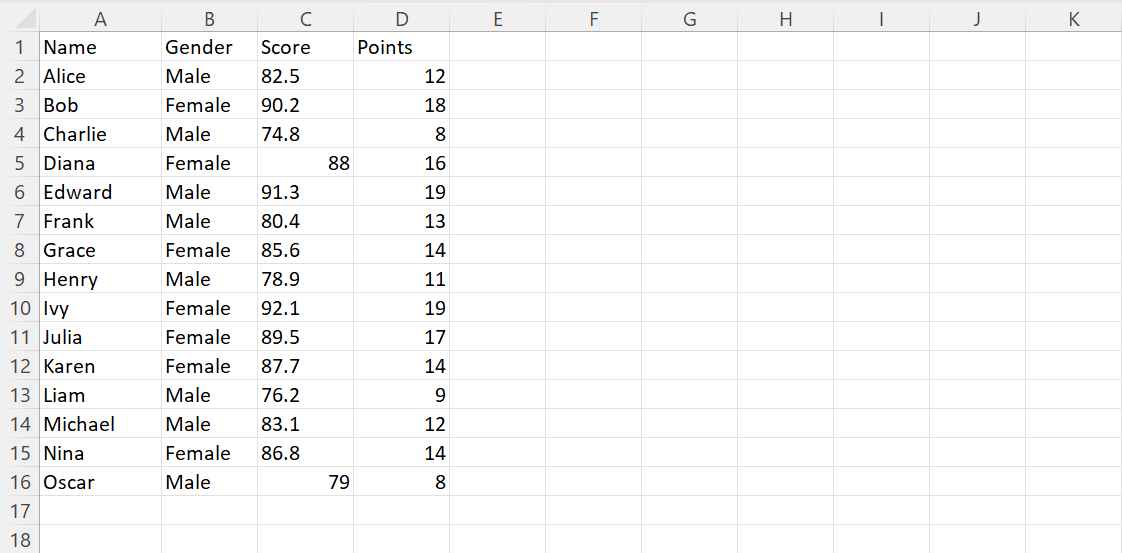
The following code will read the file and construct a Table
tbl, _ := rowan.FromExcel("data.xlsx")

tbl.First().Display()
tbl.Overview()
Output:
-------------------------------------
|  Name   | Gender | Score | Points |
-------------------------------------
| Alice   | Male   | 82.50 |   12   |
| Bob     | Female | 90.20 |   18   |
| Charlie | Male   | 74.80 |   8    |
| Diana   | Female | 88.00 |   16   |
| Edward  | Male   | 91.30 |   19   |
-------------------------------------

Table Overview
Rows: 15
Columns:
-------------------
|  Name  |  Type  |
-------------------
| Name   | string |
| Gender | string |
| Score  | float  |
| Points | int    |
-------------------
See Also#
FromCSV(path string, opts ...CSVOption)— constructs aTablefrom a CSV fileFromStructs(rows []T)— constructs aTablefrom a slice of structsOverview()Display()